


Lost your important photos and now wondering about quick photo recovery workarounds? Don’t worry, we’re here to help you!
Sudden loss of photos, either accidentally or due to any unforeseen reason, can be distressing or may put you in trouble. Ever thought what would happen if you lost your priceless moments or work-related photos without any warning? Just because something got deleted doesn’t necessarily mean that it will never be recovered. Fortunately, there are recovery programs that may help you with photo recovery. These programs scan your storage devices like hard disk drives, SSDs, SD cards, etc., completely to look for deleted/lost images.
However, recovery success depends on various factors such as how long ago the photos were deleted, whether the storage space is overwritten by new files, which tool you are using, etc. In this guide, we’ll explore the top 5 photo recovery software to recover deleted photos. Let’s get started!
In This Article:
01: Stellar Photo Recovery

Stellar Photo Recovery is a dedicated multimedia recovery program which allows you to recover photos, videos, and audio files in various file formats. This program can come in handy for photographers and others who have lost their photos from SD cards, memory cards, cameras, USBs, hard drives, etc. Whether your photos are deleted due to accidental deletion, formatting, storage device corruption, etc., this photo recovery program can help you easily restore them.
The Stellar Photo Recovery program can even recover various RAW photos captured from Canon, Nikon, Sony, Olympus, Kodak, and other popular camera brands. One of the most amazing features of this software is its preview functionality, which allows you to preview the recoverable files before saving them. This helps you to save only the required images instead of restoring everything found during the scan.
Key Features:
- Recovery of Deleted Photos: Completely scans your storage devices for photos that have been accidentally deleted or lost due to other possible data loss reasons.
- Raw Photo Recovery: Supports various raw format photos that are usually used by professional photographers.
- Recovery of Formatted or Corrupted Storage Devices: Allows scanning of formatted or corrupted storage devices to recover multimedia files.
- Preview of Photos: The preview feature lets you preview the recoverable photos before restoring them.
- Deep Scanning: Performs deep scanning of your storage devices when quick scan fails to find the necessary files.
- Supported by Windows and Mac OS: The software is available for both Windows and macOS devices.
- Simple Interface: Known for its easy and simple-to-use interface, which you can use to recover deleted files in a few simple clicks.
Why Should You Choose Stellar Photo Recovery?
This photo recovery software is especially recommended when you need to restore deleted photos of various file formats including JPEG, PNG, TIFF, etc. The software’s ability to handle image files and camera memory cards makes it a good option for professional photographers or even non-tech users who need to retrieve photos from different storage devices.
Also, the software follows a relatively simple process of recovery: select the type of file you want to restore, scan a storage device, preview files and save recovered data.
02: EaseUS Data Recovery Wizard

EaseUS Data Recovery Wizard is an all-purpose data recovery program that can retrieve not just photos but also other types of deleted data such as documents, video files, music, and many more. It helps recover deleted files from various storage devices such as USBs, SD cards, hard drives, and many more.
It features a user-friendly interface, which makes it quite easy for you to restore deleted files without having any technical knowledge. In order to restore your lost photos, you have to first scan the drive, filter the files that can be restored and recover those files on your computer. For restoring photos easily and quickly, it is recommended that you do not use the drive right away after losing your photos.
Key Features:
- Thoroughly scans your storage device to find recoverable photos that are deleted from various storage devices.
- Supports recovery of deleted photos from hard drives, USB drives, memory cards and other supported internal or external devices.
- Scans deeply in case the regular scan does not give the required result.
- This functionality is helpful when you preview the files that can be recovered in order to save only the important ones.
Why Choose EaseUS Data Recovery Wizard?
EaseUS is helpful when the photo deletion is part of a larger data-loss problem. The software supports recovery of deleted files of various types, including photos, videos, documents, etc., whether lost due to accidental deletion, formatting, system corruption, or other data loss scenarios.
The other benefit of this program is its powerful scanning capabilities combined with an easy-to-use interface.
03: PhotoRec
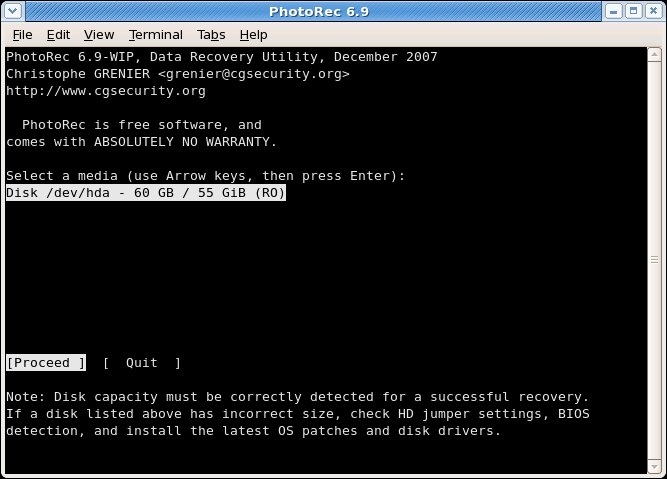
PhotoRec is a free, open source photo recovery tool from CGSecurity, the team also behind TestDisk. Instead of relying on the drive’s file system to locate deleted photos, it scans the storage media at a raw data level and rebuilds files by recognising their signatures. That approach lets it recover images even when a partition has been formatted or the file system is damaged, and it runs on Windows, macOS, and Linux.
Because PhotoRec isn’t limited to photos, it can also come in handy when picture loss is part of a bigger data recovery job that includes documents or other files. The trade-off is a plainer, keyboard-driven interface, and recovered photos usually lose their original file names in the process.
Key Features:
- Signature-Based Recovery: Scans storage devices for known file signatures rather than relying on the file system, which helps when a drive is formatted or corrupted.
- Broad Device Support: Works with hard drives, SSDs, USB drives, memory cards, and other common storage media.
- File Type Filtering: Lets you narrow a scan to specific file types before starting, which can help focus a search on photos.
- Free and Open Source: The full recovery tool is available at no cost, with no trial restrictions.
- Cross-Platform: Available for Windows, macOS, and Linux, so it can be used across different systems.
Why Choose PhotoRec for Photo Recovery?
PhotoRec is a reasonable pick if you want a no-cost way to attempt photo recovery and don’t mind a more technical, text-based workflow. It doesn’t include the preview-before-recovery convenience that Stellar Photo Recovery or EaseUS Data Recovery Wizard offer, so you’ll typically need to sort through recovered files afterward to find the photos you actually need.
It can still be a useful option to have on hand, particularly for formatted memory cards or drives where a quick, free scan is worth trying before turning to a paid tool.
04: Recuva
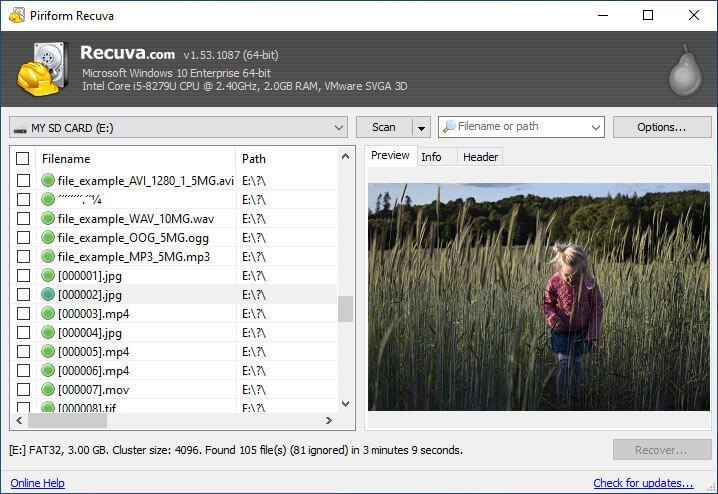
Recuva, developed by Piriform, is a popular Windows-based photo recovery software. It is one of the top recovery solutions especially if you need a simple and inexpensive way to recover recently deleted files. It can easily recover your deleted photos as well as other computer data from Windows PCs, USB drives, memory cards, and other supported storage devices.
If the basic scan fails to find your recoverable files, you can use the “Deep Scan” option to perform a thorough scan of your storage devices. Due to its user-friendly interface, Recuva is easy to use to perform file recovery, especially for recovering your recently deleted images and other files.
Key Features:
- Provides a convenient interface that makes basic file recovery possible for non-experienced users.
- The “Deep Scan” feature of this photo recovery software performs a thorough scanning to find traces of deleted files.
- Can perform recovery of deleted files from SD cards, USB drives, and many other internal or external storage devices.
- Recovers photos, videos, documents, archives and other supported files of various formats.
Why Choose Recuva for Photo Recovery?
This software can be very appropriate for those who want to perform photo recovery in simple steps or without complex interface. However, it is important to note that this software does not have all the features that high-end data recovery software offers.
This can be an excellent place to start when one needs to recover photos that were deleted from the hard drive of a Windows PC or from USB drives or memory cards.
05: Wondershare Recoverit
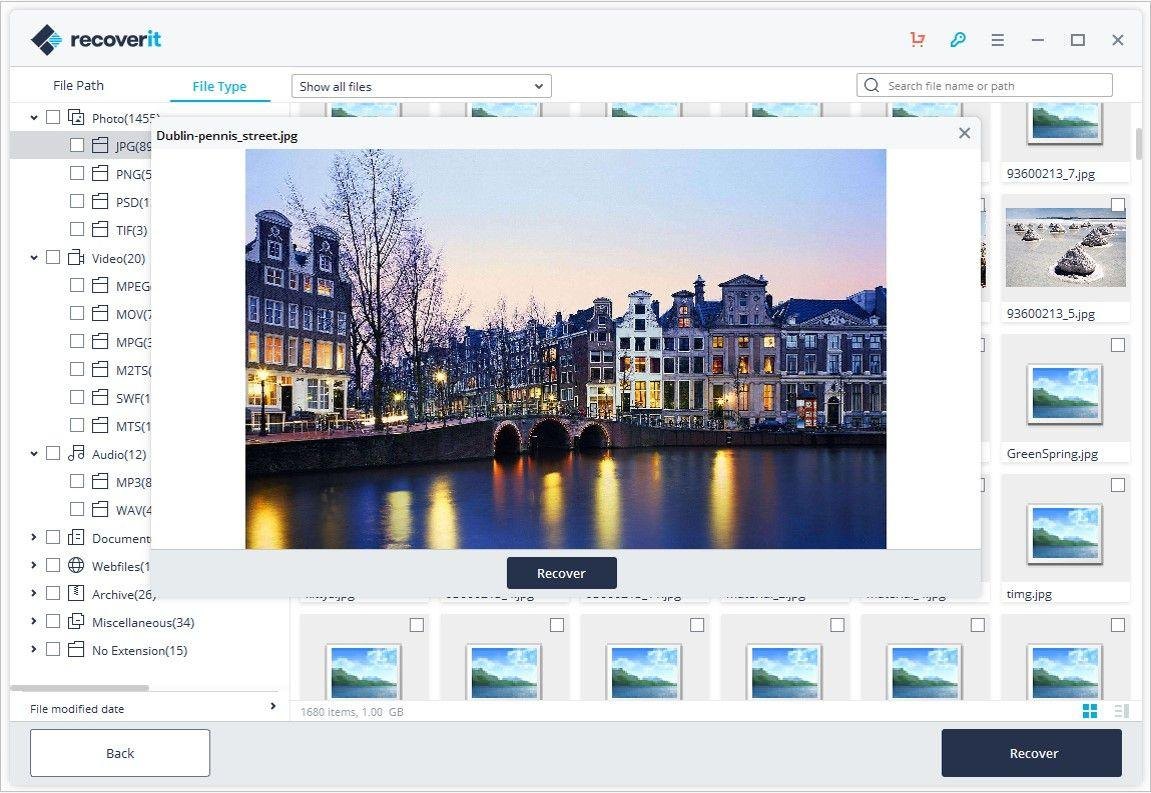
Wondershare Recoverit is a complete data recovery tool that can help you retrieve lost, deleted or inaccessible photographs from different storage devices. This software is capable of recovering photographs from internal and external hard drives, SSDs, USB drives, SD cards, memory cards and other storage media. Whether your photos are deleted accidentally or lost due to formatting, partition corruption, system crash, or other data loss reasons, this software works well in every scenario.
This software follows a simple recovery process to recover deleted files from your PC. Moreover, after scanning, it also lets you preview the recoverable files to find out if the photos are really required or not. Also, the success of the recovery operation depends on the state of the storage device and if the deleted photos have not been overwritten.
Key Features:
- The software is capable of recovering several image formats captured from digital cameras, computer hard drives, memory cards, and external storage devices.
- The Advanced scanning feature of this tool lets you find deleted, lost, formatted, or inaccessible images which may remain undetected during normal scanning.
- Works well with different storage devices including hard disks, SSDs, USBs, SD cards, memory cards, and other compatible devices.
- The Preview feature lets you preview the recoverable images before restoring them so you can easily determine what pictures to restore.
- Provides an option of filtering and sorting which help you locate the desired image formats among a large number of recoverable files.
Why Choose Wondershare Recoverit for Photo Recovery?
This photo recovery software is the best option when you need to restore deleted image files of various file formats. Its extensive file-format support makes it suitable for situations where a storage device contains different types of important files. The simple interface of this tool makes the recovery simple and easy even for less experienced users.
FAQs – Top 5 Photo Recovery Software
Can I recover deleted photos without any backup?
Yes! If you don’t have any backup of your lost photos – try recovering them using a professional photo recovery tool.
Which is the best photo recovery software of 2026?
Top 5 photo recovery software that can help you restore deleted photos are:
- Stellar Photo Recovery – Best Overall
- EaseUS Data Recovery Wizard – Best for quick recovery
- PhotoRec – Best free, open source recovery tool
- Recuva (Windows) – Best open source
- Wondershare Recoverit – Best recovery solution
In what data loss situations can recovery software help?
Most of the professional photo recovery tools support recovery of photos and other types of media files deleted accidentally or lost due to formatting, storage corruption, and other data loss reasons.
Does data recovery software work with encrypted drives?
Yes, but only with the necessary keys, and only with some data recovery tools. Without the keys to decrypt the drive, many data recovery software will be unable to recover any data.
Conclusion
There is no universal recovery tool that will surely provide you with all the features for photo recovery. The most optimal one depends on the device used, file system, method and conditions of deletion. When you find photos deleted from your PC, it’s essential to act fast in order to recover your photos before they get overwritten by new files.
Before you choose any photo recovery software, carefully check its features and then choose the one that best fits your requirements. Moreover, you can consider preventive measures like maintaining regular backups, installing reliable antivirus tools, etc., to help in the future with such data loss issues.