
Let’s get real for a second. You’re not just a button-pusher with a fancy lens. You’re a chaser of light, a collector of fleeting seconds. The quiet tear escaping a father’s eye. The explosive, head-thrown-back laughter between old friends. The almost invisible story is told in the space between two people’s hands. You capture these silent, sacred things.
Now imagine taking those beautiful, frozen heartbeats and stitching them together into a living, breathing pulse! This is the real work of a cinematic slideshow. It’s digital alchemy. It transforms a collection of gorgeous images into a kinetic poem, an experience that hits with the force of a memory. In a world saturated with visuals, a masterful slideshow isn’t just another product in your package; it’s a seismic event. It’s the thing that turns a happy client into a true believer, an evangelist for your work, telling every single person they know about the magic you created. But here’s the rub: the market is a jungle, a chaotic mess of software all promising to be “the one.” How on earth do you find the right tool for your visual poetry—something powerful enough to feel like magic, yet simple enough that you’re not shackled to your desk for an eternity?
In this guide, photographers of every stripe—from seasoned pros capturing their hundredth wedding, family, or portrait session, to passionate amateurs just starting to find their voice—will unlock the perfect creative partner! Let’s explore 4 tools for creating a slideshow with music and pictures, including SmartSHOW 3D, Adobe Express, Magix Photostory, and Canva.
In This Article:
The Heavy Hitters: Storytelling Tools for the Modern Photographer
These are the programs that just get it. They understand what photographers actually need, blending raw, professional power with an interface that feels like it was designed by an artist, for an artist.
1. SmartSHOW 3D: The 3D Sorcerer for Windows
For those who want to dive deep. Really deep. If you’re looking to create effects that make jaws hit the floor, SmartSHOW 3D is a beast. This Windows-based software is a powerhouse disguised in a surprisingly friendly package, engineered for one purpose: to make your static images move, breathe, and feel intensely alive with 3D animation. Sound intimidating? Don’t let it be. You can have a stunning project up and running in minutes using one of its 700+ professional templates. With multi-layered audio, voiceovers, and a staggering arsenal of visual effects, it’s an incredibly versatile and powerful choice.

2. Adobe Express: The All-in-One Cloud Companion
For photographers already living and breathing in the Adobe ecosystem, or for anyone who just needs a flexible, do-it-all cloud tool, Adobe Express has become a serious contender. It’s less of a single app and more of a fluid creative current. It’s brilliant. The workflow is pure butter. Drag, drop, remix. The massive library of professionally designed templates, fonts, and royalty-free Adobe Stock music means you’re never starting from zero. Because it’s an all-in-one tool, keeping your brand consistent across all your client deliverables is almost effortless. While the premium subscription unlocks the heavy-duty features, the free version is shockingly capable of creating beautiful visual stories on the fly.
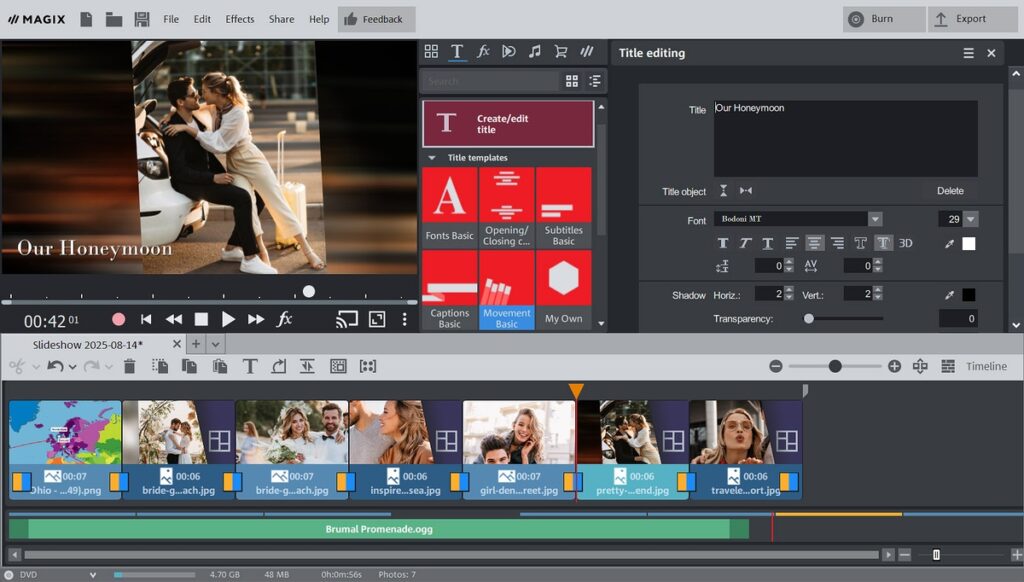
3. Magix Photostory Deluxe: The Feature-Packed Globetrotter
Here is another titan for the Windows crowd, and this one feels less like a slideshow maker and more like a full-fledged video editing suite. Its knockout feature? Something destination wedding photographers will fall head over heels for: animated travel maps. Just picture it. You can actually show the journey, flying your viewers from the couple’s hometown in Ohio to the rolling hills of Tuscany before the first photo even appears. It’s brilliant. Pure genius. With stunning 4K output, a massive library of songs and effects, and advanced tools to make every image and soundbite pop, Magix ensures your stories look and sound phenomenal, no matter the screen.
4. Canva: The Swiss Army Knife You Already Use
Wait, Canva? For slideshows? Hear me out. While it’s not just a slideshow tool, this ubiquitous design platform has become a secret weapon for savvy photographers. Designing your pricing guides, your social media graphics, and your client welcome packets. Well, nestled inside is a surprisingly nimble and powerful video editor that’s perfect for crafting chic, stylish slideshows. Its real superpower is brand synchronicity. The ability to use your exact fonts, colors, and logos means the teaser slideshow you send a client looks and feels like it came from the exact same universe as their invoice and final gallery. It’s the ultimate tool for creating those gorgeous, on-brand videos for social media and client previews with impossible speed.
Your Story. Your Tool.
So, where do you land? No guide can give you the right answer. It’s a vibration. A gut feeling. A choice that needs to harmonize with the rhythm of how you create.
This isn’t just about picking software. It’s about choosing your collaborator. Its only aim is to turn a series of photos into a story so captivating, it’ll make them laugh, cry, and cherish it for years to come.